
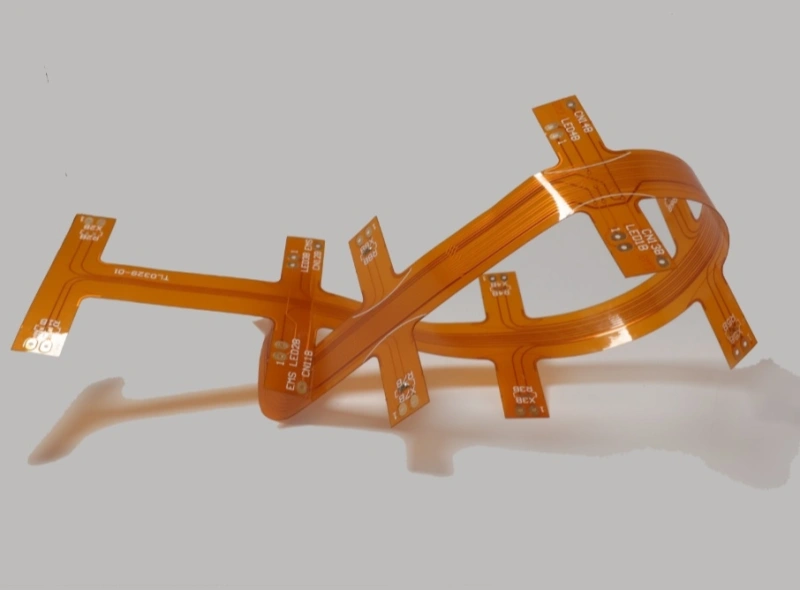
طراحی مدار FPC — مشکلات رایج
- همپوشانی پدها (به جز پدهای SMD) به معنای همپوشانی سوراخها است.
وقتی سوراخها روی هم قرار میگیرند، مته ممکن است همان نقطه را چندین بار سوراخ کند. مته ممکن است بشکند. سوراخ ممکن است آسیب ببیند. این باعث تولید ضایعات یا نیاز به بازکاری میشود. - در بردهای چندلایه ممکن است دو سوراخ روی هم قرار گیرند.
برای مثال، یک حفره پد عایق است. حفره دیگر پد اتصال با پرتوهای حرارتی (تخفیف حرارتی) است. پس از ترسیم فیلم، ممکن است تنها پد عایق نمایش داده شود. آن قطعه قابل دور ریختن است.
I. همپوشانی پدها
- همپوشانی پدها (به جز پدهای نصب سطحی) به معنای همپوشانی سوراخها است.
در حین سوراخکاری، مته یک نقطه را بارها سوراخ میکند. مته ممکن است بشکند. سوراخ آسیب خواهد دید. - در بردهای چندلایه ممکن است دو سوراخ روی هم قرار گیرند.
برای مثال، یک حفره پد ایزولاسیون است. حفرهٔ دیگر پد اتصال است، برای مثال پد تخلیهٔ حرارتی. پس از ساخت فیلم، تصویر ممکن است پد ایزولاسیون را نشان دهد. این باعث دور ریختن میشود.
II. سوءاستفاده از لایههای گرافیکی
- برخی از لایههای گرافیکی ردیابیهای بیفایده دارند. ممکن است یک برد چهارلایه با خطوطی شبیه به یک برد پنجلایه ترسیم شود. این باعث سردرگمی میشود.
- برای صرفهجویی در زمان، برخی طراحان از لایه Board در Protel برای خطوط روی لایههای متعدد استفاده میکنند. آنها همچنین خطوط یادداشتگذاری را روی لایه Board رسم میکنند. هنگام تهیه دادههای فوتوپلات ممکن است لایه Board را انتخاب نکنند. در این صورت برخی ردها از بین میروند و مدار باز میشود. یا ممکن است یادداشتگذاری لایه Board را انتخاب کرده و باعث اتصال کوتاه شوند. بنابراین هنگام طراحی، لایههای گرافیکی را کامل و واضح نگه دارید.
- روال معمول را بشکنید. برای مثال، قرار دادن سمت قطعه روی لایهٔ پایین و سمت لحیمپذیری روی لایهٔ بالا. این کار مونتاژ و لحیمکاری را دشوار میکند.

III. جایگذاری تصادفی متن سیلکاسکرین
- متن میتواند روی پدها یا لندهای SMD قرار گیرد. این امر تست الکتریکی و لحیمکاری قطعات را دشوار میکند.
- اگر متن خیلی کوچک باشد، چاپ ابریشمی دشوار است. اگر متن خیلی بزرگ باشد، حروف روی هم میافتند و خواندنشان دشوار میشود.

IV. تنظیم اندازه سوراخ برای پدهای یکرو
- پدهای یکطرفه معمولاً نیازی به سوراخ ندارند. اگر به سوراخ نیاز باشد، آن را بهوضوح علامتگذاری کنید. در صورتی که به سوراخ نیازی نیست، اندازهٔ سوراخ را روی صفر تنظیم کنید. اگر مقدار عددی تعیین شود، دادههای حفاری شامل مختصات آن سوراخ خواهند شد و باعث مشکل میشود.
- اگر پد یکطرفه نیاز به علامت سوراخ دارد، آن را بهطور ویژه مشخص کنید.
۵. استفاده از نواحی پرشده برای ترسیم پدها
- اگر پدهایی با نواحی پرشده طراحی کنید، طرح میتواند DRC را پاس کند. اما در تولید نمیتوان از چنین پدهایی استفاده کرد. این پدهای شبهپد نمیتوانند دادههای ماسک لحیمکاری را بهدرستی تولید کنند. هنگام اعمال ماسک لحیمکاری، ناحیه پرشده توسط ماسک پوشانده میشود. این امر لحیمکاری قطعه را دشوار میکند.
VI. نواحی تغذیه یا زمین که هم پدهای حرارتی و هم مسیرهای برد هستند
- اگر ناحیهٔ تغذیه یا زمین بهعنوان پدهای آزادسازی حرارتی ترسیم شود، تصویر روی برد واقعی برعکس طرح خواهد بود. همهٔ مسیرها مسیرهای ایزولاسیون هستند. طراحان باید در این مورد کاملاً روشن باشند.
- هنگام ترسیم چندین گروه ایزولاسیون تغذیه یا زمین، مراقب باشید. فاصلهای ایجاد نکنید که باعث اتصال کوتاه بین دو گروه تغذیه شود. محل مورد نیاز برای اتصال را مسدود نکنید و یک ناحیه تغذیه را تقسیم نکنید.
۷. تعریف نامشخص پشته و ترتیب لایههای ساختگی
- اگر برد یکرو تنها روی لایهٔ بالا طراحی شود و هیچ یادداشتی اضافه نشود، مشخص نیست کدام سمت جلو و کدام سمت پشت است. پس از قرار دادن قطعات، ممکن است لحیمکاری برد ساخته شده دشوار باشد.
- برای مثال، یک برد چهارلایه ممکن است به صورت TOP، MID1، MID2 و BOTTOM طراحی شود. اگر سازنده لایهها را به همان ترتیب چیدمان نکند، مشکلاتی پیش خواهد آمد. بنابراین توضیحات واضحی دربارهٔ ترتیب لایهها اضافه کنید.
VIII. تعداد زیاد نواحی پر شده یا نواحی پر شده با خطوط بسیار نازک
- دادههای فتوپلات ممکن است ناقص باشد و دادهها ممکن است از دست بروند.
- مناطق پرشده در فتوپلوت به صورت خطوط متعدد رسم میشوند. این امر یک مجموعه داده بسیار بزرگ ایجاد میکند. حجم بالای داده، پردازش آن را دشوار میسازد.
۹. پدهای SMD خیلی کوتاه
- این بر آزمون پیوستگی الکتریکی تأثیر میگذارد. برای بسیار متراکم SMD در قطعات، فاصله بین پدها کم و عرض پدها باریک است. پینهای تست باید بهصورت جفتجفت، یکی بالاتر و یکی پایینتر یا یکی سمت چپ و یکی سمت راست، قرار گیرند. اگر پد خیلی کوتاه باشد، ممکن است پینهای تست نتوانند جای خود را پیدا کنند. این موضوع تست را دشوار میکند، حتی اگر قطعه قابل قرارگیری باشد.
فاصلهٔ مش برای نواحی بزرگ مسی بیش از حد کوچک است.
- برای یک شبکه مسی بزرگ، فاصله بین لبههای خطوط ممکن است خیلی کم (کمتر از ۰.۳ میلیمتر) باشد. در حین ساخت برد و پس از توسعه، بسیاری از ذرات کوچک فیلم میتوانند به برد بچسبند. این میتواند باعث ایجاد خطوط باز شود.
XI. ناحیه بزرگ مس بیش از حد به حاشیه برد نزدیک است
- مساحت بزرگ مسی باید حداقل ۰٫۲ میلیمتر از حاشیه برد فاصله داشته باشد. اگر مسیکاری یا فرزکاری به داخل ناحیه مسی نفوذ کند، ممکن است لایه مسی بلند شود. این امر میتواند باعث جدا شدن ماسک لحیم شود.
۱۲. طراحی نامشخص دور تاج
- برخی مشتریان خطوط دور برد را روی لایههای Keep، Board و Top overlay رسم میکنند و این خطوط با هم مطابقت ندارند. این موضوع کار سازنده PCB را برای انتخاب خطوط دور مناسب دشوار میکند.
۱۳. طراحی گرافیک نامتوازن
- در طول آبکاری الکتریکی، الگوهای نامنظم باعث آبکاری نامنظم میشوند. این امر بر کیفیت تأثیر میگذارد.
۱۴. هنگام ریختهگریهای بزرگ مس، برای جلوگیری از حفرههای SMT از توری استفاده کنید.
- وقتی ناحیه ریختهگری مس بزرگ است، از الگوی توری استفاده کنید. این کار احتمال وجود حباب یا جداشدگی لایهها را در حین ریفلو SMT کاهش میدهد.
عیوب سطحی بردهای FPC و راهحلها
در زیر، نقصهای سطحی رایج را فهرست میکنم. بردهای انعطافپذیر FPC و علل و راهحلهای واضحی ارائه دهید.
۱. حبابها بین ردیفها یا روی یک ردیف پس از توسعه
علت اصلی: حبابها بین خطوط یا روی یک خط تکی معمولاً زمانی رخ میدهند که فاصله خطوط خیلی کم و ارتفاع خطوط خیلی زیاد باشد. در حین چاپ سیلک، ماسک لحیم نمیتواند به ماده پایه بین خطوط بلند دسترسی پیدا کند. هوا یا رطوبت بین ماسک لحیم و پایه باقی میماند. در حین پخت و نوردهی، گاز محبوس منبسط شده و حباب ایجاد میکند. برای یک ردیف، ارتفاع ردیف بیش از حد است. وقتی تیغ چاپ با زاویه بزرگتری به ردیف برخورد میکند، ماسک لحیم نمیتواند به ریشه ردیف برسد. گاز بین ریشه ردیف و ماسک لحیم باقی میماند. حرارت باعث ایجاد حباب میشود.
اصلاح: در حین چاپ سیلک بازرسی کنید. مطمئن شوید که ماسک لحیمکاری بهطور کامل سطح پایه و دیوارههای جانبی مسیر را میپوشاند. جریان آبکاری را در فرآیند آبکاری الکتریکی بهطور دقیق کنترل کنید.
۲. قلعپوشی ماسک در سوراخها و نقصهای ریز سوراخمانند در الگو
علت اصلی: وقتی چاپ سیلک بهموقع انجام نشود، جوهر باقیمانده روی شابلون انباشته میشود. تحت فشار اسکوییج، جوهر اضافی میتواند به داخل سوراخها فشرده شود. تعداد توریهای کم در شابلون نیز باعث میشود جوهر وارد سوراخها شود. آلودگی روی ماسک فوتو باعث میشود نواحی که باید در معرض نور قرار گیرند، باز نمانند. این امر در حین نوردهی باعث ایجاد سوراخهای ریز در الگو میشود.
اصلاح: چاپ سیلک را بهموقع انجام دهید و از توریهایی با تعداد سوراخهای بیشتر استفاده کنید. در حین نوردهی، ماسک فوتو را بهخوبی بررسی کنید.
۳. تیره شدن ردهای مس زیر ماسک لحیمکاری
علت اصلی: پس از پاک کردن برد، آب خشک نشد. سطح برد قبل از چاپ ماسک لحیم خیس شد. یا انگشت یا دست انسان به برد برخورد کرد.
اصلاح: در حین چاپ سیلک، هر دو سطح مسی را از نظر اکسیداسیون بهصورت بصری بررسی کنید. مطمئن شوید برد قبل از چاپ خشک و تمیز است.
۴. آلودگی سطحی و سطح ناهموار
علت اصلی: آلودگی از گرد و غبار و الیاف معلق در هوا ناشی میشود. سطح ناهموار زمانی ایجاد میشود که صفحه تمیز نشده باشد و جوهر باقیمانده روی آن باقی بماند و به تخته منتقل شود.
اصلاح: اتاق تمیز را تمیز نگه دارید و اپراتورها را تمیز نگه دارید. از ورود افراد غیرضروری به اتاق تمیز جلوگیری کنید. اتاق را مرتباً تمیز کنید. در حین چاپ سیلک، بهموقع روی کاغذ چاپ کنید تا جوهر باقیمانده از شابلون پاک شود.
۵. ثبت اشتباه و ترکهای ریز
علت اصلی: اشتباه در ثبت زمانی رخ میدهد که در حین چاپ سیلک، برد بهطور محکم ثابت نشده باشد. جوهر باقیمانده روی شابلون بهموقع پاک نمیشود و در الگویی روی برد فشار داده میشود، بنابراین نقاطی در نزدیکی پدها ظاهر میشوند. ترکهای ریز زمانی ایجاد میشوند که تابدهی خیلی ضعیف باشد. دوز نور یا زمان کافی نیست، بنابراین ترکهای کوچک شکل میگیرند.
اصلاح: برای ثابت نگهداشتن برد از پینهای همترازی استفاده کنید. با چاپ مکرر روی کاغذ، جوهر باقیمانده روی سکرین را پاک کنید. نوردهی را طوری تنظیم کنید که انرژی لامپ و زمان نوردهی سطح مناسبی از نوردهی را فراهم کنند. سعی کنید شاخص نوردهی را در محدوده مناسب نگه دارید تا ترک ایجاد نشود.
۶. تفاوت رنگ بین دو طرف و چاپ مفقوده (لکههای سفید)
علت اصلی: دو طرف در حین چاپ تعداد تیغههای مختلف دارند. یا جوهرهای قدیمی و جدید با هم مخلوط شدهاند. برای مثال یک طرف از جوهر جدید همزده استفاده میکند و طرف دیگر از جوهر قدیمی باقیمانده استفاده میکند.
نبود چاپ یا “حذف چاپ” زمانی رخ میدهد که جریان الکتروپلیتینگ بیش از حد بالا باشد. در این حالت، لایه پلیتینگ خط را بیش از حد بلند میسازد. در حین چاپ سیلک، ارتفاع زیاد خط باعث میشود تیغهی اسکوییجی نتواند جوهر را روی کنارههای مسیر منتقل کند. علت دیگر این است که تیغهی اسکوییجی دارای یک لبپریدگی است. ناحیهی لبپریدگی جوهر را منتقل نمیکند.
اصلاح: تعداد اسکوییجها را برای هر دو طرف یکسان نگه دارید. جوهر کهنه و جدید را با هم مخلوط نکنید. جریان صفحهچینی را کنترل کنید. تیغه اسکوییج را از نظر وجود خراش بررسی کنید.
خلاصهٔ کوتاه بررسیهای کلیدی برای طراحی و ساخت FPC
- قبل از تهیه دادههای حفاری، تداخل پد و تداخل حفره را بررسی کنید.
- استفاده از لایهها را شفاف نگه دارید و از لایه برد برای خطوط و حاشیهنویسی سوءاستفاده نکنید.
- متن سیلکاسکرین را دور از پدها قرار دهید. از اندازههای خوانا استفاده کنید.
- سوراخهای پد یکطرفه را بهوضوح علامتگذاری کنید یا اندازهٔ سوراخ را روی صفر تنظیم کنید.
- اگر به ماسک لحیم مناسب نیاز دارید، پدها را بهصورت بلوک پرشده طراحی نکنید.
- دربارهٔ تخفیفات حرارتی و ریختهگریهای مس شفاف باشید. از ایزولهسازی ناخواسته اجتناب کنید.
- ستونبندی لایههای سند و ترتیب ساخت برای سازنده.
- از مناطق پر کردن بیش از حد یا خطوط پر کردن بسیار نازک خودداری کنید. اندازهٔ دادهها را معقول نگه دارید.
- پدهای SMD را به اندازه کافی بلند بسازید تا امکان دسترسی برای تست با پروب فراهم شود.
- فاصلهٔ مشبک مسی بزرگ را معقول نگه دارید (حداقل ۰٫۳ میلیمتر بین لبهها).
- فاصلهی نواحی بزرگ مسی را از لبهی برد حداقل ۰٫۲ میلیمتر نگه دارید.
- یک طرح کلی واضح از برد ارائه دهید. چندین طرح کلی مختلف را روی لایههای مختلف قرار ندهید.
- تراکم الگو را متعادل کنید تا از آبکاری نامنظم جلوگیری شود.
- برای جلوگیری از مشکلات SMT در ریختهگریهای بزرگ مس از توری استفاده کنید.

