

















Definicija
Koriste se aluminijske tiskane pločice. u mnogim stvarima koje treba hladiti. Ove ploče imaju metalnu podlogu koja odvodi toplinu od ključnih dijelova. Imaju tri glavna sloja: debelu bakrenu foliju, poseban dielektrični sloj i aluminijsku podlogu. To omogućava ploči da bolje podnosi toplinu nego obične tiskane pločice. Aluminijske tiskane pločice su dobre za elektroniku velike snage, LED svjetla i pogone motora. Koriste se tamo gdje bi toplina mogla oštetiti sklopove ili smanjiti njihov rad.
Ključne značajke
Aluminijske PCB ploče su čvrste i vrlo dobro odvode toplinu. Bakreni sloj je debeo i može provesti veći tok struje. Dielektrični sloj brzo odvodi toplinu. Aluminijska podloga čini ploču čvrstom i pomaže joj da se ohladi. Neke ploče imaju posebnu membranu za dodatnu sigurnost. Ovdje je tabela koja navodi glavne materijale u aluminijskim PCB pločama:
Tip sloja | Opis |
|---|---|
Sloj bakarne folije | Deblje od uobičajenih CCL-ova (1 oz–10 oz) za veći kapacitet provođenja struje. |
Dielektrični sloj | Termalno provodljivo, debljine od 50 μm do 200 μm, s niskim toplotnim otporom. |
Aluminijska baza | Izrađen od aluminijskog podloge, pruža visoku toplotnu provodljivost. |
Aluminijska bazna membrana | Zaštitni sloj za aluminijsku površinu, dostupan u dvije vrste na osnovu tolerancije temperature. |
Ove ploče ostaju stabilne čak i kad je vruće ili hladno. Imaju znatno nižu toplinsku otpornost od drugih tiskanih pločica. Možete ih koristiti u zahtjevnim uvjetima i ne brinuti se da će otkazati.
Usporedba s FR-4
Možda se pitate kako se aluminijske PCB ploče razlikuju od FR-4 ploča. FR-4 ploče koriste stakloplastiku i epoksid, koji loše provode toplinu. Aluminijske PCB ploče imaju znatno niži toplotni otpor. Bolje se hlade i manje mijenjaju veličinu kad su vruće. Evo tabele koja pokazuje u čemu se razlikuju:
Karakterističan | Aluminijske štampane ploče | FR-4 tiskani pločevci |
|---|---|---|
Sloj bakarne folije | Deblji (1 oz–10 oz) za veći kapacitet | Tanje od aluminijskih PCB-ova |
Dielektrični sloj | Termalno provodljivo, niska toplotna otpornost | Manje efikasno |
Aluminijska baza | Visoka toplotna provodljivost | Ne aluminij |
Temperaturni otpor | 20-22 stepena po vatu | |
Dimenzionalna stabilnost | Promjena veličine 2.5%-3.0% u rasponu temperature od 30 do 140 °C | Veća promjena veličine pod utjecajem toplote |
Koeficijent toplotnog širenja | Blizu bakra (22ppm/C) | Varira, može dovesti do problema |
Pouzdanost | Izuzetno pouzdano | Manje pouzdano |
Primjene | Opće primjene |
Savjet: Ako vam je potreban pločni sklop za velike snage ili za vruća mjesta, odaberite aluminijske PCB-ove. Oni bolje rade i duže traju u vašim uređajima.
Struktura
Bakreni sloj
Bakreni sloj nalazi se na vrhu ploče. Ovaj sloj prenosi električne signale i napajanje između komponenti. Bakreni sloj u aluminijskim PCB-ovima je deblji nego u standardnim pločama. Deblji bakar omogućava protok većeg strujnog intenziteta i pomaže pri prijenosu topline. Možete odabrati različite debljine bakra prema svojim potrebama. Evo tabele koja prikazuje tipičan raspon debljine za bakarne slojeve:
Težina bakra | Debljina (mil) | Debljina (mikrona) |
|---|---|---|
0,5 oz/kv ft | 0.671 | 17.05 |
1,0 oz/kv ft | 1.34 | 34.1 |
2,0 unci po kvadratnoj stopi | 2.68 | 68.1 |
3,0 unce po kvadratnoj stopi | 4.02 | 102.2 |
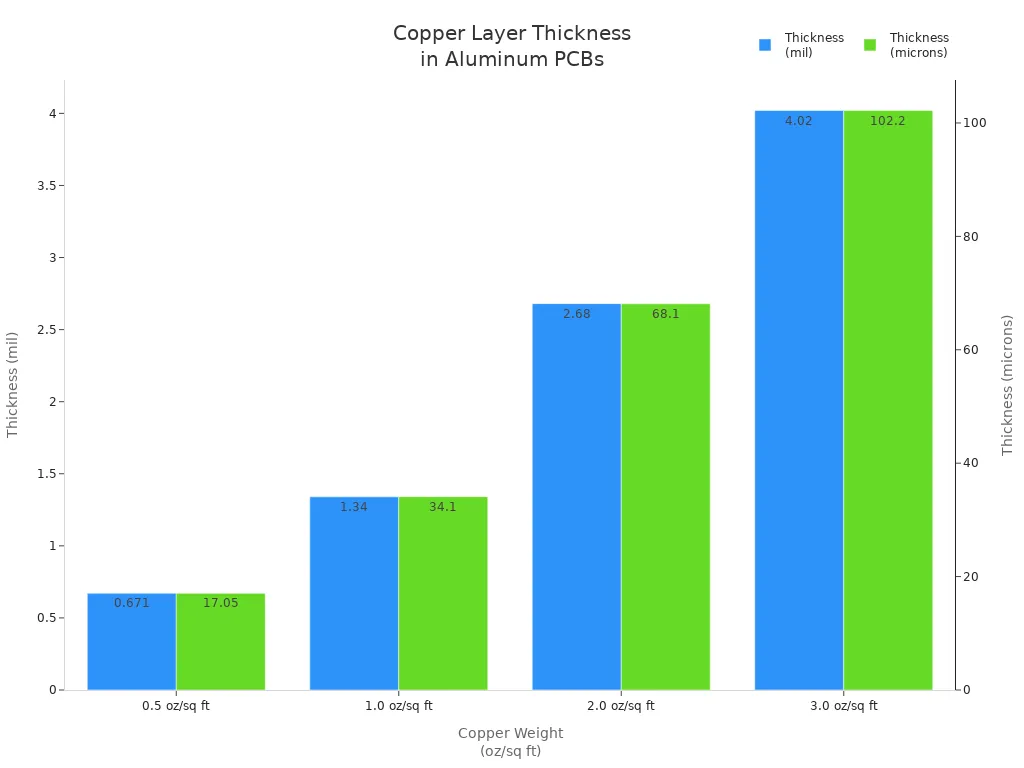
Vidite da veće težine bakra daju deblje slojeve. Deblji bakar pomaže vašoj ploči da podnese više snage i toplote. Dobijate bolje performanse u kolima s velikom strujom.
Dielektrični sloj
Dielektrični sloj se nalazi između bakra i aluminijske osnove. Ovaj sloj izolira bakar od metalne osnove. Također prenosi toplinu s bakra na aluminij. Potrebno vam je dielektrik koji ima visoku toplinsku provodnost i nisku električnu provodnost. Većina ploča koristi posebnu smolu ili polimer za ovaj sloj. Debljina dielektričnog sloja utječe na to koliko se vaša ploča hladi. Tanki slojevi brže provode toplinu, ali debeli slojevi pružaju bolju izolaciju. Morate uravnotežiti ove karakteristike za svoj dizajn.
Aluminijska baza
Aluminijska podloga čini temelj ploče. Ovaj sloj daje vašoj ploči čvrstoću i stabilnost. Aluminij vrlo dobro provodi toplinu. Odvodi toplinu od bakrenih i dielektričnih slojeva. Dobijate bolje hlađenje za vaše komponente. Aluminijska podloga također čini vašu ploču čvrstom. Odupire se savijanju i oštećenjima. Možete koristiti aluminijske PCB-ove na mjestima s vibracijama ili udarima. Neke ploče koriste laminat obložen bakrom (CCL) za poboljšanje performansi. Možete vidjeti kroz rupe izolirane smolom u podlozi. Te rupe vam omogućavaju montažu komponenti i štite ih od električnih kratkih spojeva.
Savjet: Odaberite pravu debljinu za svaki sloj kako biste postigli najbolju kombinaciju hlađenja, čvrstoće i električnih performansi.
Maska za lemljenje i sitoštampa
Maska za lemljenje i sitotisak slojevi pomažu zaštititi i označiti vaš aluminijski PCB. Ti slojevi se nanose na bakrene tragove. Važni su za to kako ploča radi i izgleda.
Maska za lemljenje
Maska za lemljenje prekriva bakrene tragove na vašem aluminijskom PCB-u. Ovaj sloj djeluje kao štit. Štiti bakar od zraka, vode i prljavštine. Maska za lemljenje također sprječava stvaranje neželjenih mostova od kalaja tokom sklapanja. To znači da imate manje kratkih spojeva i da vaša ploča bolje radi.
Većina maski za lemljenje izrađena je od zelene epoksidne smole. Također možete odabrati bijelu, crnu, crvenu ili plavu. Boja ne utječe na funkcionalnost ploče. Može vam pomoći da uočite probleme ili da se uklopi s vašim brendom.
Evo nekoliko glavnih razloga za korištenje maske za lemljenje na vašim aluminijskim PCB-ovima:
Sprječava kratke spojeve zaustavljajući širenje kalaja.
Štiti bakar od hrđe i oštećenja od okoline.
Poboljšava izgled i olakšava provjeru ploče.
Povećava izdržljivost tako ploča duže traje na teškim mjestima.
Savjet: Ako koristite LED diode, bijela maska za lemljenje je dobra. Ona reflektuje više svjetlosti i pomaže da vaša ploča ostane hladna.
Sitotisak
Sloj sitotiska stavlja riječi i simbole na vaš aluminijski PCB. Koristite ovaj sloj za ispis imena, brojeva i logotipa. Sitotisak vam pomaže pronaći komponente, brojeve pinova i testne tačke.
Većina sitotiska je bijela, ali možete koristiti i druge boje. Tinta mora izdržati toplotu i hemikalije prilikom izrade ploče. Dobar sitotisak znatno olakšava izradu i popravku ploče.
Ovdje je tabela koja pokazuje kako se zaštitna maska za lemljenje i sitoštampa razlikuju:
Sloj | Glavna funkcija | Tipični materijal | Uobičajena boja |
|---|---|---|---|
Maska za lemljenje | Štiti bakar, sprječava kratke spojeve | Epooksna smola | Zeleni |
Sitotisak | Dodaje oznake i oznake | Tinta otporna na toplotu | Bijeli |
Zašto su ovi slojevi važni
Za čvrstu aluminijsku PCB ploču potrebni su vam i zaštitni sloj za lemljenje i sitoštampa. Zaštitni sloj za lemljenje održava vašu ploču sigurnom i osigurava dobro funkcionisanje. Sitoštampa vam omogućava jasne oznake za montažu i popravke. Uvijek dodajte ove slojeve kada dizajnirate svoju aluminijsku PCB ploču za najbolje rezultate.
Napomena: Dobra maska za lemljenje i sitoštampa pomažu da vaš aluminijski PCB bolje radi i duže traje, čak i na zahtjevnim mjestima.
Prednosti
Rasipanje toplote
Morate osigurati da vaši elektronički uređaji ostanu hladni, posebno kada rukuju velikom snagom. Aluminijske PCB ploče pomažu vam da upravljate toplinom mnogo bolje nego standardne ploče. Metalna podloga brzo odvodi toplinu od važnih dijelova. To održava vaše sklopove sigurnima i u dobrom radu. Kada koristite LED diode velike snage ili pretvarače napajanja, toplina se može brzo nakupiti. Ako ne uklonite tu toplinu, vaše komponente mogu otkazati.
Aluminijske tiskane ploče imaju izvrsnu toplinsku provodljivost. To znači da odvode toplinu od vrućih tačaka i rasprostiru je po cijeloj ploči. Time smanjujete rizik od oštećenja svojih kola. Također produžujete vijek trajanja svojih uređaja. Mnogi inženjeri biraju aluminijske tiskane ploče za visokobitne sklopove i snagu elektronike jer održavaju hladnoću i stabilnost.
Jeste li znali? PCB-ovi od aluminija mogu tako dobro podnijeti toplinu da su najbolji izbor za LED rasvjetu i napajanja. Dobijate bolje performanse i manje kvarova.
Izdržljivost
Želite da vaše ploče traju, čak i kada se suočavaju sa teškim uslovima. Aluminijske štampane ploče pružaju vam izuzetnu izdržljivost. Održavaju se bolje na toploti, vibracijama i udarima nego mnoge druge vrste ploča. Metalna osnova čini da se ploča manje savija ili lomi.
Aluminijske tiskane ploče imaju toplinsku provodljivost od oko 600 puta veće od FR-4 ploče. Ovo im omogućava da se brzo riješe toplote, što je važno pri radovima na visokim temperaturama.
Koeficijent toplinske ekspanzije (CTE) za FR-4 je mnogo veći nego kod bakra. To može uzrokovati probleme kada se ploča zagrije i ohladi. Možete vidjeti pukotine ili odvajanje slojeva.
Koeficijent toplinskog širenja aluminija je blizu onog bakra. Ova usklađenost znači manje naprezanja na ploči tokom zagrijavanja i hlađenja. Više nećete vidjeti toliko kvarova poput delaminacije ili polomljenih tragova.
Možete vjerovati aluminijskim PCB-ovima da će dobro raditi na mjestima gdje se temperatura mnogo mijenja. Oni zadržavaju svoj oblik i nastavljaju raditi, čak i nakon mnogo ciklusa zagrijavanja i hlađenja.
Gustoća pakovanja
Često je potrebno smjestiti više krugova u ograničenom prostoru. Aluminijske tiskane ploče omogućuju vam to sigurno. Budući da tako dobro odvode toplinu, komponente možete postaviti bliže jedna drugoj. Ne morate se toliko brinuti o pregrijavanju.
Evo tabele koja pokazuje zašto je gustoća pakovanja važna:
Značajka | Korist za vas |
|---|---|
Visoka disipacija toplote | Postavite dijelove bliže jedan drugom. |
Jaka baza | Podržava više komponenti |
Stabilan učinak | Manji rizik od pregrijavanja |
Možete dizajnirati manje, lakše uređaje bez žrtvovanja snage ili pouzdanosti. To čini aluminijske PCB-ove pametnim izborom za modernu elektroniku gdje je prostor ograničen.
Pouzdanost
Želite da vaši uređaji rade svaki put kad ih koristite. Ovo je vrlo važno ako ih koristite dugo vremena ili na teškim mjestima. Aluminijske štampane ploče Pomažu da vaši uređaji budu pouzdaniji. Sprječavaju mnoge probleme koji mogu oštetiti obične ploče.
Aluminijske štampane ploče Može podnijeti toplotu, vodu i tresanje. Metalna baza drži ploču ravnom i čvrstom. Ne morate brinuti da će se slojevi odvojiti. Ploča ostaje cjelovita, čak i ako je ispustite ili je koristite u mašinama koje se kreću.
Evo nekoliko razloga zašto Aluminijske tiskane pločice su tako pouzdani:
Termalna stabilnostAluminijska podloga brzo odvodi toplinu. To održava vaše dijelove hladnima i pomaže im da traju duže. Vidjet ćete manje problema uzrokovanih prekomjernom toplinom.
Mehanička čvrstoćaMetalno jezgro čini ploču vrlo čvrstom. Ne savija se niti lomi lako. Možete je koristiti u automobilima, tvornicama ili na otvorenom.
Otpornost na vlagu: Aluminijske štampane ploče Ne upijaju vodu kao neke druge ploče. To sprječava kratka spojevanja i rđu.
Dosljedna izvedbaPlata nastavlja raditi čak i kad je vruće ili hladno. Dobijate dosljedne rezultate u svim vremenskim uslovima.
Napomena: Ako vam treba pločica za LED svjetla, napajanja ili automobilsku elektroniku, Aluminijske tiskane pločice su odličan izbor.
Možete vidjeti prednosti u ovoj tabeli:
Značajka | Prednost pouzdanosti aluminijskih PCB-ova |
|---|---|
Otpornost na toplotu | Sprječava termičko oštećenje |
Snažna struktura | Smanjuje rizik od pukotina ili lomova |
Zaštita od vlage | Zaustavlja koroziju i kratka spojevanja |
Stabilna izvedba | Dobro radi pri promjenjivim temperaturama |
Manje ćete popravljati svoje ploče. To vam štedi novac i vrijeme. Kada koristite Aluminijske tiskane pločice, vaši uređaji nastavljaju raditi.
Mnoge kompanije koriste Aluminijske tiskane pločice za važne zadatke. Nalazite ih u medicinskim uređajima, uličnim svjetlima i pogonskim jedinicama. Ove ploče nastavljaju raditi kada bi druge mogle prestati.
Ako želite da ploča traje, odaberite Aluminijske tiskane pločice. Manje ćete se brinuti i vaši projekti će bolje funkcionirati.
Savjet: Uvijek provjerite da li je vaš Aluminijski PCB Dobavljač koristi kvalitetne materijale. Pažljiv rad čini vašu ploču još pouzdanijom.
Vrste aluminijskih PCB-ova
Jednoslojni
Jednoslojne aluminijske tiskane pločice Dobre su za jednostavne poslove. Imaju jedan bakarni sloj na vrhu. Ispod bakra se nalazi dielektrik i aluminijska podloga. Ove ploče koristite za osnovne sklopove. Ne zahtijevaju složene dizajne. Izrada ploče je jednostavna. Dobro podnosi toplinu i je čvrsta.
Jednoslojne aluminijske tiskane ploče (PCB) koriste se u LED svjetlima, napojnim modulima i automobilskim senzorima. Na njih možete lako postaviti komponente. Aluminijska podloga brzo odvodi toplinu. To sprječava pregrijavanje komponenti. Manje je problema uzrokovanih pregrijavanjem. Ako želite ploču koja dobro radi u primjenama visoke snage, jednoslojne aluminijske tiskane ploče su pametan izbor.
Ključne prednosti jednostrukih aluminijskih PCB-ova:
Jednostavan dizajn ih čini lakim za izgradnju.
Cijena je niža nego kod ploča s više slojeva.
U osnovnim krugovima dobro odvode toplinu.
Izdržljiv i snažan za teška mjesta
Savjet: Koristite jednostruke aluminijske PCB-ove za LED trake i pretvarače napona. Dugo traju i dobro rade.
Dvostruki sloj
Dvoslojne aluminijske tiskane pločice (PCB) namijenjene su za složenije krugove. Ove pločice imaju dva bakrena sloja. Između bakrenih slojeva nalazi se dielektrik. Aluminijska podloga je na dnu. Možete slati signale s obje strane. To vam pruža više mogućnosti za dizajniranje vaše pločice.
Dvostruke aluminijske tiskane pločice omogućuju vam da na ploču postavite više komponenti. Ne gubite dobru kontrolu temperature. Dodatni bakar pomaže pri napajanju i signalima. Dvostruke aluminijske tiskane pločice nalaze se u tvorničkim upravljačkim sustavima, automobilskoj elektronici i naprednim LED pogonima.
Prednosti dvostrukih aluminijskih PCB-ova:
Više načina za povezivanje dijelova u zahtjevnim krugovima
Može primiti više dijelova za napredne dizajne
Dva bakrena sloja pomažu boljem prijenosu topline
Pogodno za površinske i kroz-rupe komponente
Dobijate kombinaciju povoljne cijene i snažnih performansi. Dvostruke aluminijske PCB ploče pomažu vam da napravite uređaje s više funkcija.
Višeslojni
Višeslojne aluminijske tiskane pločice namijenjene su najzahtjevnijim zadacima. Ove pločice imaju tri ili više bakrenih slojeva. Između slojeva se nalaze dielektrični materijali. Aluminijska podloga sve drži na okupu. Možete provesti mnogo signala i napojnih linija. Višeslojne aluminijske tiskane pločice podnose brze krugove i velika opterećenja snagom.
Koristite višeslojne aluminijske tiskane pločice u telefonima, napajanjima i medicinskim alatima. Dodatni slojevi odvajaju napajanje i signale. To smanjuje šum i poboljšava rad pločice. Aluminijska podloga održava pločicu hladnom, čak i uz mnogo komponenti.
Zašto odabrati višeslojne aluminijske PCB-ove?
Dobro za tvrde i zbijene staze
Bolja kontrola toplote za snažne uređaje
Manje električne buke i bolji signali
Snažna potpora za teške dijelove
Tip | Slojevi | Tipični slučajevi upotrebe | Temperaturna performansa | Trošak |
|---|---|---|---|---|
Jednoslojni | 1 | LED trake, napojni moduli | Dobro | Nisko |
Dvostruki sloj | 2 | Industrijska upravljanja, automobilski | Bolje | Srednje |
Višeslojni | 3+ | Telekomunikacije, medicina, napajanja | Najbolje | Više |
Napomena: Višeslojne aluminijske tiskane pločice pružaju vrhunske performanse za zahtjevnu i moćnu elektroniku. Dobro rade i ostaju hladne.
Odaberite pravi tip aluminijske PCB ploče za vaš projekt. Postižete bolje rezultate kada odaberete najbolju ploču za vaše potrebe.
Fleksibilan
Fleksibilne aluminijske PCB ploče omogućavaju izradu novih vrsta uređaja. Ove ploče se mogu savijati i uvijati, ali se ne lome. Koriste se tamo gdje je prostor ograničen ili gdje ploča mora biti pokretna. Fleksibilne aluminijske PCB ploče imaju prednosti metal-core PCB-ova i mogu se savijati.
Vidite fleksibilne aluminijske PCB-ove u LED trakama i nosivim uređajima. Nalaze se i u automobilskim svjetlima. Ove ploče vam pomažu da formirate oblike koje krute ploče ne mogu. Možete ih omotati oko kutova ili smjestiti u zakrivljene prostore. To vam pomaže da kreirate zanimljive i korisne dizajne.
Ključne karakteristike fleksibilnih aluminijskih PCB-ova:
Tanki i lagani dizajn
Dobro provodi toplinu za bolje hlađenje
Može se savijati, presavijati ili uvijati bez loma
Ostaje čvrst pri tresanju i udarcima
Savjet: Ako se vaš uređaj pomjera ili ima poseban oblik, koristite fleksibilnu aluminijsku PCB. Time dobijate i savijanje i dobru kontrolu toplote.
Fleksibilne aluminijske PCB ploče imaju tanku aluminijsku podlogu. Koriste poseban fleksibilni dielektrični sloj. Bakreni sloj je na vrhu, kao i kod drugih aluminijskih PCB ploča. Fleksibilni dielektrični sloj omogućava ploči da se savija i istovremeno odvodi toplinu. Ove ploče koristite tamo gdje bi se obične PCB ploče napukle ili polomile.
Ovdje je tabela koja pokazuje kako se fleksibilne aluminijske PCB ploče razlikuju od krutih aluminijskih PCB ploča:
Značajka | Fleksibilna aluminijska štampana pločica | Tvrda aluminijska štampana ploča |
|---|---|---|
Fleksibilnost | Može se savijati i uvijati | Ostaje ravno |
Termalno upravljanje | Odlično | Odlično |
Težina | Lagani | Teži |
Uobičajene upotrebe | Nosivi uređaji, LED-i | Napajanja |
Možete lemiti dijelove na fleksibilne aluminijske PCB ploče kao i na krute ploče. Fleksibilan dizajn ne čini ploču slabom niti gubi kontrolu nad temperaturom. Dobijate istu čvrstu ploču s više mogućnosti dizajna.
Fleksibilne aluminijske PCB ploče pomažu vam riješiti probleme u novoj elektronici. Možete napraviti uređaje manje, lakše i izdržljivije. Ove ploče dobro funkcioniraju u proizvodima koji se kreću ili kojima je potrebno da stanu na neobična mjesta.
Napomena: Uvijek provjerite koliko savijate fleksibilne aluminijske PCB-ove. Ako ih previše savijete, možete oštetiti ploču ili komponente.
Hibrid
Hibridne aluminijske PCB ploče Nudimo vam dvije vrste karakteristika. Miješate različite materijale kako biste dobili ono što želite. Većina hibridnih aluminijskih PCB-ova koristi aluminijsku podlogu i druge slojeve pločice, poput FR-4 ili fleksibilnog poliimida. Ova kombinacija vam pomaže uskladiti cijenu, čvrstoću i hlađenje.
Koristite hibridnu aluminijsku PCB kada vam je potrebno dobro hlađenje na jednom mjestu, a normalni krugovi na drugom. Na primjer, napajne komponente postavite na aluminijsku stranu, a signalne komponente na FR-4 stranu. Na taj način štedite novac i prostor.
Prednosti hibridnih aluminijskih PCB-ova:
Prilagođeno hlađenje za različite dijelove ploče
Košta manje od punih aluminijskih višeslojnih ploča.
Više načina za dizajniranje tvrdog kolosijeka
Dobro za mješovito-signalne i napojne poslove
Vidite hibridne aluminijske PCB-ove u napajanjima i upravljačkim jedinicama automobila. Također se nalaze u LED pogonima. Ove ploče vam pomažu da na jednoj ploči rukujete velikom snagom i osjetljivim signalima.
Evo nekih uobičajenih tipova hibridnih aluminijskih PCB-ova:
Aluminijska podloga s FR-4 slojevima na vrhu
Aluminijska podloga s fleksibilnim poliamidnim slojevima
Aluminijska baza s i krutim i fleksibilnim dijelovima
Savjet: Koristite hibridne aluminijske PCB ploče kada vam je potrebno snažno hlađenje i napredne karakteristike kola. Dobijate ploču koja odgovara vašim potrebama.
Hibridne aluminijske PCB ploče pomažu vam da napravite pametniju i bolju elektroniku. Možete riješiti teške probleme s toplinom i prostorom. Ove ploče pomažu vam da izgradite bolje proizvode za današnji tehnološki svijet.
Primjene
Moćna elektronika
Moćna elektronika nalaze se u uređajima koji mijenjaju ili kontroliraju električnu energiju. To uključuje napajanja, regulatore napona i upravljače motorima. Ovi krugovi se mogu jako brzo zagrijati. Ako ih ne ohladite, vaš uređaj bi mogao prestati raditi ili ne raditi ispravno. Aluminijske tiskane pločice pomažu u rješavanju ovog problema. Metalna podloga odvodi toplinu od napojnih komponenti. To omogućava da vaš uređaj radi duže i sigurnije.
Mnogi inženjeri biraju aluminijske PCB ploče za snagu elektroniku. One su dobre za visoke struje i napone. Vidite ih u solarnim inverterima, punjačima baterija i velikim snage modulima. Čvrsta podloga drži teške dijelove i ne savija se lako. Ove ploče možete koristiti na zahtjevnim mjestima poput tvornica ili na otvorenom.
Savjet: Kada izrađujete snagu elektroniku, koristite ploču koja se brzo hladi. To štiti vaše sklopove i pomaže da vaš uređaj traje duže.
LED rasvjeta
LED svjetla moraju ostati hladna da bi dobro radila. Jarke LED diode stvaraju mnogo toplote. Ako ne odvedete tu toplotu, LED diode mogu posvijetljeti ili se pokvariti. Aluminijske štampane ploče Pomaže da LED diode ostanu hladne. Metalna podloga raspoređuje toplotu i odvodi je od LED dioda.
Aluminijske PCB ploče nalazite u uličnim svjetiljkama, farovima automobila i ekranima. Ove ploče omogućavaju da smjestite više LED dioda u malom prostoru. Dobijate jarko svjetlo koje dugo traje. Maska za lemljenje štiti bakar i čini da ploča izgleda lijepo. Možete odabrati bijelu masku za lemljenje kako bi odbijala više svjetla i pomogla pri hlađenju.
Ovdje je tabela koja pokazuje na koje načine aluminijske PCB ploče pomažu.:
Područje primjene | Prednosti aluminijskih PCB-ova |
|---|---|
LED rasvjeta | Odvodi toplotu iz svijetlih LED dioda, pa one traju duže. |
Automobilska elektronika | Pomaže baterijama električnih automobila da podnesu toplotu iznad 100 W. |
Obnovljiva energija | Koristi se u solarnim pretvaračima za hlađenje napojnih krugova. |
Industrijska automatizacija | Čini ploče čvrstim na vrućim mjestima. |
Napomena: Ako želite da vaše LED svjetlo bude jako i da dugo traje, koristite aluminijske PCB ploče. One se bolje hlade i ne kvare se toliko često.
Automobilski
Aluminijske PCB ploče nalaze se u mnogim automobilskim elektronskim sistemima. Moderni automobili imaju više senzora, svjetala i kontrolnih jedinica. Ti dijelovi trebaju ploče koje mogu podnijeti toplotu, vibracije i udarce. Aluminijske PCB ploče pružaju hlađenje i čvrstoću koja vam je potrebna.
Električni automobili koriste aluminijske PCB ploče u baterijskim sistemima. Ove ploče podnose toplotu veću od 100 vata. Metalna podloga održava ploču hladnom i sigurnom. Također se aluminijske PCB ploče mogu naći u prednjim svjetlima, kočionim svjetlima i na instrument tabli. Ploča se ne savija niti lomi pri udarcima ili tresanju.
Elektronika vašeg automobila radi dobro i ne puca kad je vruće ili kad je hladno. Možete vjerovati da će vaš automobil raditi ljeti i zimi.
Savjet: Za automobilsku elektroniku koristite ploču koja ostaje hladna i čvrsta. Aluminijske PCB ploče pomažu da vaš automobil radi sigurno i dobro.
Industrijska oprema
U mnogim fabričkim mašinama nalaze se aluminijske tiskane ploče. Ove ploče pomažu mašinama da rade dobro i traju duže. Mašine u fabrikama rade mnogo sati svaki dan. Mogu se jako zagrijati ako se koriste dugo. Ako se toplota ne kontroliše, mašine bi mogle stati ili se pokvariti.
Aluminijske PCB ploče pomažu u kontroli toplote u mašinama. Metalna osnova odvodi toplotu od komponenti za napajanje. To održava mašine sigurnima i u dobrom radu. Vidite aluminijske PCB ploče u upravljačima motorima i pretvaračima napajanja. Također se nalaze u automatizacijskim sistemima. Ove ploče sprječavaju da se mašine pregriju i otkažu.
Mnogi uređaji koriste elektroniku velike snage. Na primjer, aluminijske tiskane pločice nalazite u:
Robotski krakovi
Trake za transport
Napajanja za fabrike
Zavarivački aparati
Svjetla koja se koriste u tvornicama
Ove mašine trebaju čvrste štampane ploče. Aluminijske PCB ploče se ne lome od tresanja ili udaraca. Metalna osnova održava ploču ravnom i čvrstom. Ne morate brinuti o pukotinama ili slomljenim linijama. Vaše mašine nastavljaju raditi, čak i u teškim uslovima.
Savjet: Da bi vaše mašine duže trajale i rjeđe zastajkivale, odaberite aluminijske PCB-ove za kontrolne ploče.
Aluminijske tiskane ploče također čine mašine sigurnijima. Ploče mogu podnijeti visoke struje i napone. Dielektrični sloj drži bakar i metal odvojeno. To sprječava kratka spojanja i štiti radnike.
Evo tabele koja pokazuje kako aluminijske PCB ploče pomažu mašinama:
Značajka | Pogodnost za industrijsku opremu |
|---|---|
Visoka toplotna provodljivost | Sprječava pregrijavanje pogonskih dijelova |
Snažna mehanička osnova | Ne lomi se od tresanja |
Dobra električna izolacija | Sprječava kratke spojeve |
Dug vijek trajanja | Štedi novac na popravkama |
Možete izrađivati manje i lakše kontrolne ploče s aluminijskim PCB-ovima. Ove ploče vam omogućavaju da smjestite više dijelova u malom prostoru. Ne morate brinuti o nakupljanju topline. Time se štedi prostor u mašinama i kontrolnim kutijama.
Aluminijske PCB ploče također pomažu u ispunjavanju sigurnosnih propisa. Mnoge fabrike trebaju mašine koje rade na vrućim ili prljavim mjestima. Maska za lemljenje štiti bakar od prašine i vode. Sitotisak omogućava jasne oznake za jednostavno postavljanje.
Ako želite mašine koje dobro rade i sigurne su, koristite aluminijske PCB-ove. Dobijate bolje rezultate, manje zaustavljanja i štedite novac. Vaše mašine će raditi bolje za vas!
Proizvodnja
Priprema materijala
Izrada aluminijskog PCB-a počinje pripremom odgovarajućih materijala. Za ploču su potrebna tri glavna sloja: bakrena folija, toplinski provodljivi dielektrik i aluminijska podloga. Svaki sloj je važan za funkcionisanje ploče.
Mjedena folijaOdabireš debljinu bakra prema tome koliko struje treba tvom krugu. Deblji bakar može prenijeti više snage i pomaže odvođenju topline.
Dielektrični slojOvaj sloj se nalazi između bakra i aluminija. Mora dobro provoditi toplinu i spriječiti curenje električne struje. Većina proizvođača ovdje koristi posebnu smolu ili polimer.
Aluminijska bazaOdabireš aluminijsku bazu jer je čvrsta i odvodi toplinu od vrućih tačaka. Baza često ima poklopac koji štiti od ogrebotina i hrđe.
Morate održavati sve materijale čistima i bez prljavštine ili ulja. Svaka prašina može kasnije u procesu uzrokovati probleme. Također trebate izrezati aluminijsku podlogu na odgovarajuću veličinu za vašu ploču. Ovaj korak pomaže u izradi čvrste i pouzdane tiskane pločice.
Savjet: Uvijek provjerite kvalitetu aluminijske baze i bakarne folije. Dobri materijali pomažu da vaša ploča traje duže i bolje podnosi toplinu.
Prijenos uzorka
Prijenos uzorka prenosi dizajn vašeg kola na bakreni sloj. Ovaj korak stvara putanje za električnu struju na vašoj ploči.
Nanesite fotorezistPrekrivate bakar filmom koji reaguje na svjetlost.
Izložiti UV zračenjuStavite masku s uzorkom kola na ploču. UV svjetlo prodire kroz masku i stvrdnjava film na mjestima gdje želite da bakar ostane.
Razviti obrazacOperite ploču da uklonite mekani film. Samo dijelovi s vašim dizajnom ostaju zaštićeni.
Zatim uklanjate višak bakra. Zaštićeni dijelovi postaju staze i padovi za vaše komponente. U ovom koraku morate biti pažljivi. Ako ostavite previše bakra, doći će do kratkog spoja. Ako uklonite previše, staze se mogu slomiti.
Napomena: Aluminijske PCB ploče zahtijevaju posebnu pažnju pri prijenosu uzorka. Aluminijska podloga može reflektovati svjetlost, pa morate koristiti odgovarajuće postavke.
Lamiranje i stvrdnjavanje
Laminizacija spaja sve slojeve. Postavljate bakar, dielektrik i aluminijsku podlogu u pravom redoslijedu. Zatim koristite toplotu i pritisak da ih stisnete u jednu ploču.
Dielektrik se malo otapa i ispunjava sve praznine.
Bakar i aluminij čvrsto prianjaju uz dielektrik.
Cijeli sloj se hladi i pretvara u čvrstu, ravnu ploču.
Kaljenje osigurava da je dielektrik potpuno očvrsnuo. Zagrijavate ploču na određenu temperaturu tokom zadanog vremena. Ovaj korak zaključava toplinu i električna svojstva koja su vam potrebna.
Ne smijete dopustiti da se tokom laminacije formiraju mjehurići zraka ili praznine. Ti problemi mogu naštetiti otpornosti ploče na toplinu i mogu dovesti do njenog kasnijeg otkazivanja. Dobra laminacija vam daje ploču koja može podnijeti toplinu i naprezanje.
Savjet: Uvijek provjerite svoje ploče nakon laminacije. Potražite savijanja, mjehuriće ili slabe tačke. Dobro laminirana aluminijska štampana pločica bolje radi i traje duže.
Bušenje i metalizacija
Bušenje i metalizacija To su važni koraci pri izradi aluminijskih PCB-ova. Potrebne su vam rupe za postavljanje komponenti i povezivanje slojeva. Ovi koraci pomažu da vaša ploča dobro radi i traje duže.
Proces bušenja
Prvo izbušite rupe kroz slojeve PCB-a. Rupe vam omogućavaju da dodate komponente i napravite spojeve. Aluminijumske PCB-ove treba posebno paziti pri bušenju. Metalna podloga je tvrđa od ostalih materijala za PCB. Morate koristiti oštre burgije i raditi pri pravoj brzini. Ako bušite prebrzo, možete oštetiti bakar ili napraviti hrapave rubove.
Postoje dvije glavne vrste rupa na aluminijskim PCB-ovima:
Probojni otvori Prođi cijelim putem kroz ploču. Koristiš ih za velike dijelove poput konektora.
Rupe izolirane smolom Unutra ima smole. Smola sprječava da rupa dodirne aluminijsku bazu. To sprječava kratke spojeve i štiti vašu ploču.
Savjet: Uvijek provjerite veličinu i položaj svake rupe prije bušenja. Dobre rupe pomažu da vaša ploča bolje radi.
Proces metalizacije
Nakon bušenja, u rupe se unosi metal. Ovaj korak se naziva metalizacija. Oblažete zidove rupa bakrom. Metalizacija povezuje gornji bakreni sloj s donjim ili drugim slojevima. Tako dobivate čvrste puteve za signale i napajanje.
Proces metalizacije ima tri glavna koraka:
Čišćenje: Čistite rupe kako biste uklonili prašinu i ulje.
AktivacijaTretiraš zidove rupe hemikalijama da bi se bakar zalijepio.
Elektropozlaćivanje: Koristiš struju da staviš bakar u rupe.
Aluminijske PCB ploče zahtijevaju dodatnu pažnju tijekom metalizacije. Rupe izolirane smolom moraju ostati prekrivene. Ako bakar dodirne aluminijsku podlogu, može doći do kratkog spoja. Morate provjeriti svaku rupu da li je dobro obložena bakrom i da nema praznina.
Ovdje je tabela koja pokazuje razlike između standardnih i smolom izoliranih rupa:
Tip rupe | Koristi se u | Potrebna izolacija | Izazov metalizacije |
|---|---|---|---|
Standardno kroznožno | FR-4, jednostavne štampane pločice | Ne | Jednostavno mesinganje |
Izolirano smolom | Aluminijske štampane ploče | Da | Pažljiva primjena smole |
Zašto su bušenje i metalizacija važni
Potrebno je pažljivo bušenje i dobra metalizacija za čvrstu aluminijsku PCB ploču. Ovi koraci pomažu vašoj ploči da podnese toplotu, napajanje i vibracije. Ako preskočite pažljiv rad, vaša ploča bi se mogla rano slomiti.
Napomena: Dobro bušenje i metalizacija čine vaše aluminijske PCB-ove sigurnijima i bolje funkcioniraju. Uvijek birajte vješte proizvođače za najbolje ploče.
Usporedba
Aluminijske štampane ploče naspram FR-4
FR-4 PCB-ovi se koriste u mnogim elektroničkim uređajima. FR-4 se sastoji od stakloplastike i epoksida. Ove ploče su pogodne za primjene s niskom potrošnjom energije. Aluminijske PCB-ove imaju metalnu podlogu. Metalna podloga odvodi toplinu mnogo brže. To znači bolje hlađenje i čvršće ploče.
FR-4 ploče se mogu zagrijati i saviti. Aluminijske PCB ploče ostaju ravne i čvrste kad su zagrijane. Možete koristiti aluminijske PCB ploče na mjestima s puno vibracija ili toplote. FR-4 ploče su jeftinije za jednostavne poslove. Aluminijske PCB ploče su skuplje, ali traju duže u zahtjevnim uvjetima.
Ovdje je tabela koja prikazuje glavne razlike:
Značajka | Aluminijske štampane ploče | FR-4 tiskani pločevci |
|---|---|---|
Osnovni materijal | Aluminij | Stakloplastika/epoksid |
Temperaturna provodljivost | Visoko | Nisko |
Mehanička čvrstoća | Snažan | Umjeren |
Trošak | Srednje | Nisko |
Najbolja upotreba | Visoka snaga, vruće tačke | Opća elektronika |
Savjet: Za snagu elektroniku ili LED svjetla odaberite aluminijske PCB-ove. Bolje odvode toplinu i traju duže.
Aluminijske tiskane pločice naspram bakrenih
Temelj ploča od bakra čini bakar. Ove ploče vrlo dobro odvode toplinu i električnu energiju. Najbolje funkcioniraju pri visokim temperaturama i u brzim krugovima. Aluminijske PCB ploče se dobro hlade pri umjerenim temperaturama i koštaju manje.
Aluminijske tiskane ploče štede novac i lakše su. Bakarne tiskane ploče su teže i skuplje. Koristite bakarne tiskane ploče za najbolje performanse. Aluminijske tiskane ploče su dobre za jeftinije projekte i mnoge vrste snage elektronike.
Ovdje je tabela koja upoređuje ove dvije vrste:
Značajka | Aluminijske štampane ploče | Bakreni štampani pločevci |
|---|---|---|
Trošak | Skupije | |
Težina | Lagani | Teži |
Termalno upravljanje | Dobro za umjerene temperature | Superiorno za visoke temperature |
Električne performanse | Prikladno za mnoge primjene | Superior, bolje za visoke performanse |
Aluminijske tiskane ploče pomažu vam uštedjeti novac i napraviti lakše uređaje.
Bakreni štampani pločici pružaju bolje performanse za vrlo zahtjevne poslove.
Napomena: Odaberite bakarne PCB ploče za vrhunsku električnu i toplotnu kontrolu. Koristite aluminijske PCB ploče za većinu poslova s napajanjem i rasvjetom.
Aluminijske PCB ploče naspram keramičkih
Keramičke tiskane ploče koriste posebne materijale poput alumine ili aluminijskog nitrida. Ove ploče podnose vrlo visoke temperature i dobro izoluju električnu energiju. Keramičke tiskane ploče nalaze se u zrakoplovnim, medicinskim i vojnim uređajima. Tiskane ploče od aluminija dobro kontroliraju toplinu i koštaju manje.
Keramičke tiskane pločice otporne su na hemikalije i rade u teškim uvjetima. Koštaju mnogo više od aluminijskih tiskanih pločica. Koristite keramičke tiskane pločice za najteže poslove. Aluminijske tiskane pločice dobro rade za većinu potreba za napajanjem i rasvjetom.
Evo tabele koja upoređuje sve tri vrste:
Značajka | Aluminijske štampane ploče | Bakreni štampani pločevci | Keramičke tiskane pločice |
|---|---|---|---|
Trošak | Srednje | Visoko | Veoma visoko |
Težina | Lagan | Teško | Lagan |
Temperaturna provodljivost | Visoko | Veoma visoko | Najviši |
Električna izolacija | Dobro | Dobro | Odlično |
Najbolja upotreba | Snaga, LED diode | Visokih performansi | Ekstremna okruženja |
Savjet: Odaberite keramičke PCB-ove za ekstremne temperature i hemikalije. Koristite aluminijske PCB-ove za većinu poslova koji zahtijevaju dobro hlađenje i čvrste ploče.
Savjeti za odabir
Odabir pravog PCB-a pomaže da vaš projekt radi dobro. Morate odabrati ploču koja odgovara vašim potrebama. Evo nekoliko jednostavnih savjeta za odabir najbolje Aluminijski PCB.
1. Upoznajte svoje toplotne potrebe
Razmislite o tome koliko toplote proizvodi vaš krug. Aluminijske štampane ploče su odlični za brzo odvođenje toplote. Ako se vaša ploča zagrije, na primjer kod LED svjetala ili snage elektronike, koristite Aluminijske tiskane pločice. Oni održavaju vaše dijelove hladnima i pomažu im da traju duže.
Savjet: Izaberi Aluminijske tiskane pločice ako se vaš odbojnik zagrije ili ako i obični odbojnici imaju problema s pregrijavanjem.
2. Provjerite svoj budžet
Aluminijske štampane ploče koštaju više od FR-4 ploča. Koštaju manje od bakrenih ili keramičkih PCB-ova. Ako želite dobro hlađenje i čvrstoću, ali trebate uštedjeti novac, odaberite Aluminijske tiskane pločice. Za jednostavne poslove FR-4 bi mogao biti dovoljan. Za vrlo vruće ili posebne poslove možda će vam trebati bakar ili keramika.
3. Razmislite o strukturi odbora
Možete odabrati jednostruki, dvostruki ili višeslojni. Aluminijske tiskane pločice. Jednoslojne ploče su dobre za jednostavne kola. Dvoslojne i višeslojne ploče drže više dijelova i obavljaju složenije zadatke. Fleksibilne i hibridne Aluminijske tiskane pločice su dobri za posebne oblike ili mješovite karakteristike.
Tip ploče | Najbolji slučaj upotrebe | Ključna korist |
|---|---|---|
Jednoslojni | LED trake, napojni moduli | Jednostavno, jeftino |
Dvostruki sloj | Automobilski, upravljanje | Više veza |
Višeslojni | Telekomunikacije, medicina, energetika | Kompleksan, velike snage |
Fleksibilni/Hibridni | Nosivi uređaji, prilagođeni oblici | Savijanja, prilagođeni dizajn |
4. Uzmite u obzir mehaničku čvrstoću
Ako se vaš uređaj trese, biva udaren ili je na otvorenom, koristite Aluminijske tiskane pločice. Metalna baza drži ploču ravnom i čvrstom. Dobijate bolje rezultate u automobilima, fabrikama ili vanjskim svjetlima.
5. Pogledajte električne performanse
Aluminijske štampane ploče Dobri su za velike struje i snagu. Ako vam trebaju brzi signali ili visoki napon, provjerite debljinu bakra i dielektričnog sloja. Deblji bakar i tanak dielektrični sloj pomažu pri snazi i toplini.
6. Pregledajte svoju prijavu
Odaberite PCB koji odgovara vašem poslu. Za LED svjetla koristite bijelu masku za lemljenje kako biste odrazili više svjetla. Za napajanja obratite pažnju na hlađenje i čvrste spojeve. Za automobile ili tvorničku opremu odaberite ploče s dodatnom zaštitom.
Napomena: Uvijek razgovarajte sa svojim proizvođačem PCB-a o tome šta vam je potrebno. Oni vam mogu pomoći da odaberete prave materijale i vrstu ploče za vaš Aluminijski PCB.
Ako slijedite ove savjete, odabrat ćete najbolje Aluminijski PCB za vaš projekat. Vaši uređaji će raditi bolje, trajati duže i imati manje problema s pregrijavanjem ili oštećenjima. Dobar izbor PCB-a pomaže vašim projektima da uspiju svaki put.
Savjeti za dizajn
Montaža i rupe
Prilikom dizajniranja aluminijske PCB ploče morate pažljivo planirati montažu i otvore. Metalna podloga čini bušenje drugačijim nego kod standardnih ploča. Morate koristiti otvore izolirane smolom kako biste spriječili električne kratke spojeve. Ti otvori štite vaše komponente i osiguravaju pouzdanost ploče.
Kada postavljate rupe za montažu, razmislite o tome gdje ćete pričvrstiti štampanu ploču. Postavite rupe blizu rubova za čvrstu potporu. Koristite standardne veličine vijaka i odstojnika. To vam pomaže da ploču lako postavite u kućišta ili okvire.
Evo nekoliko savjeta za montažu i rupe na aluminijskim PCB-ovima:
Koristite probojne rupe izolirane smolom za izvođe komponenti.
Ravnomjerno postavite montažne rupe na ploču kako biste izbjegli savijanje.
Izbjegavajte postavljati rupe preblizu bakrenim tragovima.
Provjerite veličinu i položaj svake rupe prije proizvodnje.
Savjet: Uvijek jasno označite rupe za montažu u datotekama vašeg dizajna štampane pločice. To pomaže proizvođaču da ih izbori na pravom mjestu.
Dobar plan montaže održava vaš aluminijski PCB čvrstim i sigurnim. Smanjujete rizik od pukotina i kratkih spojeva.
Termalni put
Morate stvoriti jasnu toplotnu putanju u dizajnu aluminijske tiskane pločice. Toplotna putanja odvodi toplinu od vrućih komponenti. Ako ne planirate ovu putanju, vaša pločica se može pregrijati.
Počnite tako što ćete dijelove koji stvaraju toplotu postaviti blizu aluminijske osnove. Koristite široke bakrene tragove za prijenos toplote. Držite toplotni put kratkim i direktnim. To pomaže vašoj ploči da se brže ohladi.
Evo jednostavne kontrolne liste za dizajn termalnog puta:
Postavite elektroničke komponente blizu aluminijske osnove.
Koristite debelu bakar za bolji prijenos topline.
Povežite točke visokog napona s velikim bakrenim površinama.
Izbjegavajte blokirati toplotni put drugim dijelovima.
Karakteristika toplotnog puta | Zašto je važno |
|---|---|
Široki bakreni tragovi | Brzo raspoređuje toplotu |
Kratka dužina puta | Smanjuje nakupljanje toplote |
Direktno povezivanje | Poboljšava efikasnost hlađenja |
Napomena: Dobra toplotna upravljačnost na aluminijskim tiskanim pločicama pomaže da vaši uređaji traju duže i rade bolje.
Možete koristiti termalne vijase za povezivanje gornjeg bakrenog sloja s aluminijskom bazom. Ove vijase omogućavaju toplini više načina za bijeg. Uvijek provjerite svoj termalni put tokom pregleda dizajna.
Ručanje i uzemljenje
Potrebno vam je pametno usmjeravanje i uzemljenje za čvrstu aluminijsku PCB ploču. Usmjeravanje znači kako raspoređujete bakrene tragove. Uzemljenje štiti vaše signale od šuma.
Držite svoje tragove kratkim i širokim za napojne vodove. To smanjuje otpor i pomaže pri odvođenju toplote. Ne prekrštajte tragove preko rupa za montažu ili oštrih rubova. To sprječava oštećenja tokom montaže.
Za uzemljenje koristite čvrstu uzemljivu ravan ako je moguće. Povežite sve tačke uzemljenja na ovu ravan. To smanjuje električni šum i poboljšava sigurnost.
Evo nekoliko najboljih praksi za ruterisanje i uzemljivanje:
Koristite široke tragove za puteve velikih struja.
Držite tragove signala podalje od tragova napajanja.
Postavite mljevene viase blizu osjetljivih komponenti.
Izbjegavajte oštre zavoje u tragovima kako biste smanjili stres.
Savjet za ruteranje i uzemljenje | Prednost aluminijskih PCB-ova |
|---|---|
Čvrsta ravan tla | Smanjuje buku, povećava sigurnost |
Široki vodovi za napajanje | Pruža veću struju, manje toplote |
Temeljne veze | Poboljšava stabilnost signala |
Savjet: Pregledajte svoje ruting i uzemljenje prije nego što pošaljete svoj dizajn proizvođaču. Dobar raspored pomaže da vaš aluminijski PCB bolje radi u stvarnim uvjetima.
Dobijate bolje performanse i pouzdanost kada slijedite ove Savjeti za dizajn aluminijskih PCB-ova.
Debljina dielektrika
Debljina dielektrika je važna za način na koji vaš aluminijski PCB radi. Utječe na to kako ploča prenosi toplinu i električnu energiju. Morate odabrati pravu debljinu za svoj projekt. Dielektrični sloj se nalazi između bakra i aluminijske osnove. Ovaj sloj drži bakar i metal odvojeno. Također pomaže u odvođenju topline od vrućih tačaka.
Ako koristite tanki dielektrični sloj, toplina iz bakra odlazi brže. To pomaže da se vaša ploča brzo ohladi. Tanki slojevi također olakšavaju prijenos topline. Uređaji poput LED svjetala ili napajanja rade bolje s manje topline.
Debeli dielektrični sloj pruža bolju električnu izolaciju. To znači da vaša ploča može sigurno podnijeti više napona. Možda će vam trebati deblji sloj za visoki napon ili dodatnu sigurnost. Ali debeli slojevi usporavaju prijenos topline. Vaša ploča može se više zagrijati ako je dielektrik previše debeo.
Morate uskladiti kretanje topline i električnu sigurnost. Evo tabele koja prikazuje razlike:
Debljina dielektrika | Temperaturna provodljivost | Električna izolacija | Najbolji slučaj upotrebe |
|---|---|---|---|
Tanki (50-100μm) | Visoko | Umjeren | Visokosnažan, LED, napajanje |
Srednje (100-150μm) | Dobro | Dobro | Opća elektronika |
Debeo (150-200μm) | Umjeren | Visoko | Visokonaponski sigurnosni krugovi |
Savjet: Za većinu aluminijskih PCB-ova odaberite debljinu dielektrika između 75 μm i 150 μm. To vam osigurava dobro hlađenje i sigurnost.
Kada dizajnirate svoj aluminijski PCB, provjerite dielektrične specifikacije. Potražite visoku toplinsku provodnost i odgovarajuću nazivnu napetost. Ako niste sigurni, zatražite pomoć od proizvođača PCB-a.
Odabir odgovarajuće debljine dielektrika pomaže da vaš PCB bolje radi. Vaša ploča će trajati duže i podnijeti teške zadatke. Uvijek prilagodite debljinu potrebama vašeg projekta. To pomaže spriječiti pregrijavanje i održava vaše sklopove sigurnima.
Aluminijske PCB ploče pomažu u kontroli toplote, dugo traju i vrlo su čvrste. Najbolje funkcioniraju u primjenama poput snage elektronike, LED rasvjete i automobilskih sustava. Ako vam treba dobar proizvođač PCB-ova, Philifast nudi napredne aluminijske PCB opcije i pažljivo provjerava kvalitetu. Prije odabira ploče razmislite o svom dizajnu i zatražite savjet od stručnjaka. Za dodatnu pomoć pogledajte tehničke vodiče ili se obratite Philifastu za odgovore.
Savjet: Koristite aluminijske PCB ploče ako vaš projekt zahtijeva izvrsnu kontrolu toplote i dug vijek trajanja.
Često postavljana pitanja
Šta je aluminijska PCB ploča?
Aluminijska PCB je tiskane pločice s aluminijskom bazom. Koristi se kada vam je potrebna bolja kontrola topline. Ova vrsta PCB-a dobro funkcionira za primjene visoke snage i LED rasvjetu.
Zašto biste trebali odabrati aluminijske PCB-ove za LED rasvjetu?
Aluminijske PCB ploče pomažu da LED svjetla ostanu hladna. Brzo odvode toplinu od LED dioda. To održava svjetla svijetlima i pomaže im da traju duže.
Možete li lako rezati ili oblikovati aluminijske PCB-ove?
Možete rezati ili oblikovati aluminijske PCB-ove, ali su vam potrebni posebni alati. Metalna podloga je tvrđa od običnih ploča. Uvijek pitajte svog proizvođača PCB-ova za najbolji način da to učinite.
Kako sloj dielektrika utiče na upravljanje toplotom?
Dielektrični sloj se nalazi između bakra i aluminija. Ako je sloj tanak i dobre kvalitete, toplina se brže prenosi na aluminijsku podlogu. To pomaže da vaši dijelovi ostanu hladni i bolje rade.
Jesu li aluminijske PCB-ove skuplje od FR-4 PCB-ova?
Aluminijske PCB ploče obično koštaju više od FR-4 PCB ploča. Plaćate dodatno za bolju kontrolu topline i čvršće ploče. Za uređaje velike snage ili za vanjsku upotrebu, dodatni trošak znači bolje performanse.
Koje aplikacije najviše koriste aluminijske PCB-ove?
Aluminijske tiskane pločice nalazite u LED svjetlima, napajanjima, automobilskoj elektronici i tvorničkim mašinama. Ove pločice najbolje funkcioniraju kada vam je potrebna snažna kontrola topline i pouzdanost.
Možete li koristiti aluminijske PCB-ove za višeslojne dizajne?
Da, možete koristiti aluminijske PCB ploče za višeslojne dizajne. Ove ploče podržavaju složene krugove i visoku snagu. Dobijate bolje hlađenje i čvrstu potporu za vaše komponente.
Kako spriječiti kratke spojeve na aluminijskim PCB-ovima?
Sprječavate kratke spojeve koristeći rupe izolirane smolom i dobar dielektrični sloj. Uvijek provjerite svoj dizajn kako biste bili sigurni da su bakar i aluminij odvojeni.