
















Validate a PCB BOM by checking that its approved parts, fitted locations, quantities, and configuration agree with the board you intend to build. Then resolve the rows that purchasing or assembly can’t execute without making a design decision.
A file can pass an upload check and still specify the wrong package. It can list every component and still belong to the wrong product variant. Finding a part in stock doesn’t establish that it can replace the approved one.
The useful checks therefore go beyond empty cells. This guide works through configuration, exact part identity, supply information, and exception closure. You’ll see an actual manufacturer package comparison, a capacitor-selection concern, and a way to preserve the connection between the released BOM and the finished assemblies.
Match the BOM to the board you’re actually building
A BOM can have every expected column and still describe the wrong build. Before checking part numbers, identify the bare board, BOM release, and assembly variant the rows should cover. Validation starts by confirming that this combination is intentional.
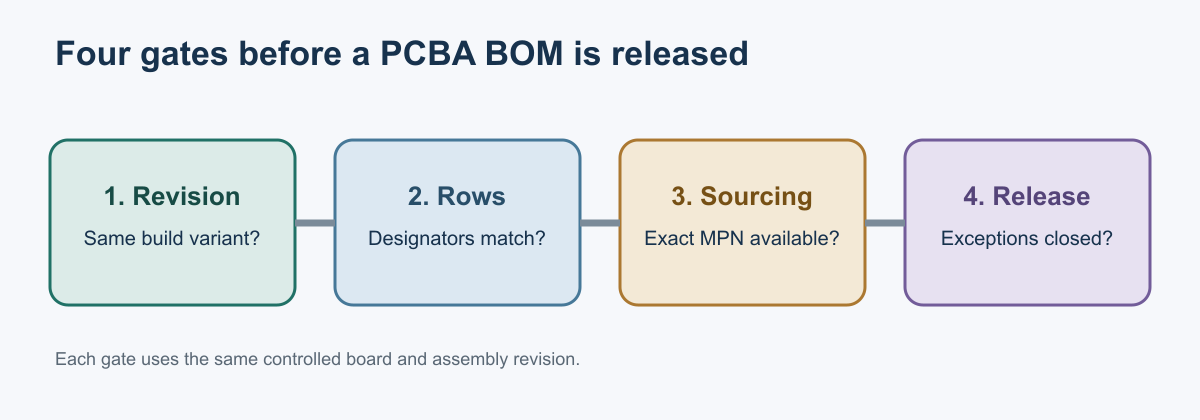
Illustration: This sequence shows a general validation approach. It does not specify FLJPCB’s internal production procedure.
Keep PCB, BOM and assembly revisions connected
Record the bare-board revision, BOM release, and assembly variant as separate identifiers. They describe the fabrication definition, component list, and population choices. Their revision letters can differ; the combination must be approved for the intended build.
Here’s an illustrative configuration: the fabrication package says Rev C, the BOM says Rev F, and the variant is “sensor / no display.” Check that combination against the released drawing or configuration record. Similar dates, filenames, or letters don’t prove a match. If an engineering change was released after the BOM export, regenerate or reconcile the BOM against the correct design source.
Carry the three identifiers in the validation record or controlled file header so purchasing, assembly, and engineering can refer to the same build. Renaming files to make the revision letters match won’t resolve a configuration conflict.
Reconcile fitted designators and DNP variants
Compare BOM references with the intended population for the assembly variant. Expand ranges such as R1-R4 into individual references; shorthand can hide a skipped or duplicated position. Check for duplicate designators, references missing from the BOM, and BOM entries absent from the released design. Resolve differences against the schematic, assembly drawing, or variant definition.
Define DNP as do not populate. A DNP position may still appear in the layout or centroid export because its footprint exists on the board. That doesn’t mean it should be purchased or populated. Mark it DNP for this variant, or omit it from the fitted-parts BOM while keeping its population state explicit in the variant definition.
An empty MPN cell is ambiguous: it could mean DNP or an incomplete row. Record an explicit status so assembly doesn’t treat an unresolved line as an instruction to omit the part.
Account for intended work with no centroid position, too. Hand-installed wires, hardware, labels, or items packed with the product may belong in the build record without being machine placed. Classify the operation and supply source. A missing centroid position needs an explanation, which may be a documented manual operation.
Separate design quantities from purchase quantities
For each fitted BOM line, verify the per-board quantity against the listed physical positions. In an illustrative row for R1, R2, and R3, the fitted quantity is three per board. A 100-board order needs 300 installed parts before purchasing allowances. Keep those two quantities distinct.
Calculate buy quantity separately using build size and purchasing assumptions. Account for customer-owned stock, packaging or order multiples, and documented setup or attrition allowance where applicable. Inputs vary by order, so don’t bake an assumed loss rate into the design quantity. Keep the requested buy quantity in the purchasing record; the released design BOM should remain reusable for later builds.
Verify the exact orderable component and its fit
A description such as “dual op amp, 8 pin” helps you read a BOM. It leaves too much open for purchasing. Follow each fitted line from its manufacturer identity through its package and circuit requirements.
Connect the manufacturer part number to the purchasing record
Record the manufacturer name and manufacturer part number (MPN), then map them to the distributor SKU or internal part number used for quoting and purchasing. That mapping lets an engineer check that the buyer’s selected line item still points to the intended component when a distributor changes its listing or offers another source.
Keep the mapping visible in the BOM or its linked sourcing record. An internal part number can be useful for repeat purchasing, but it should resolve to a specific MPN and any approved alternates. When a quote returns a different MPN, treat it as a proposed change and check it before ordering.
Read suffixes from the relevant manufacturer’s documentation. Their meanings vary across brands and product families. Some ordering codes distinguish package, temperature grade, or packing format; other attributes live in separate documents. Confirm what matters from the manufacturer’s part page, ordering information, and datasheet.
Also check the offered packing format against the planned assembly operation. Reel, cut-tape, and tray options can affect preparation even when they contain the same approved component. The parts-sourcing service provides the procurement context; engineering still needs a clear mapping between the design part and the purchased item.
Check the package and pinout against the footprint
Compare the orderable package, package drawing, pin functions, polarity, and mechanical interfaces against the schematic and library footprint. Check lead arrangement and relevant dimensions. “Eight pins” alone tells you very little about physical fit.
For a real example, TI lists the LM358DR in an 8-pin SOIC (D) package and the LM358P in an 8-pin PDIP (P) package. Both belong to the LM358 family, but these packages require different PCB interfaces. Check TI’s LM358DR details and LM358P details. This comparison illustrates a package check; it is not an alternate recommendation.
| Example orderable part | Package | Pins |
|---|---|---|
| TI LM358DR | SOIC (D) | 8 |
| TI LM358P | PDIP (P) | 8 |
Connectors need a mechanical check beyond their electrical description. Compare the mating series, orientation, keying, mounting features, and available enclosure space. For polarized components, resolve pin-one and polarity conventions against the component drawing and assembly instructions.
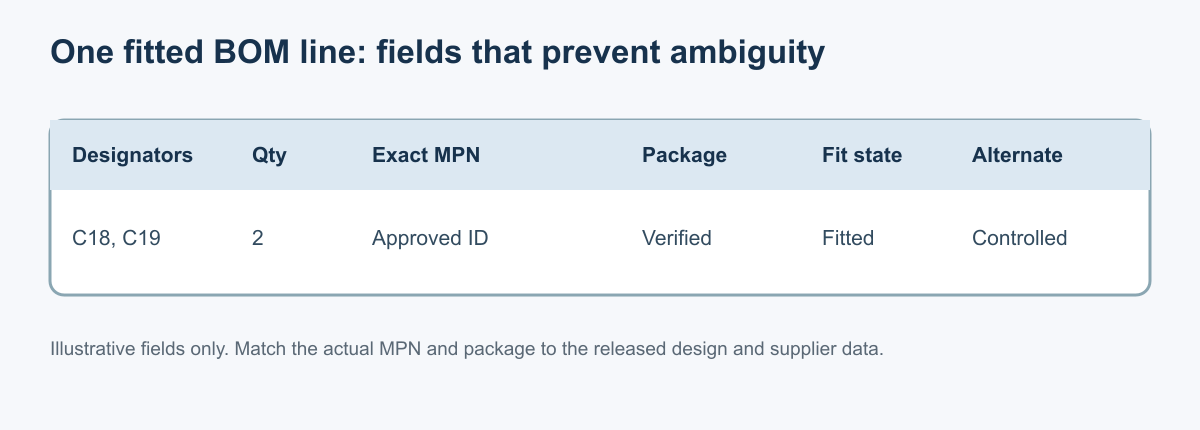
Illustration: This example row is a conceptual aid. Check designators and quantity against the released design, the MPN against manufacturer information, and the package against the footprint.
Evaluate performance at the actual operating conditions
Start with the component’s job in the circuit. The important comparison might involve voltage and current limits, tolerance, temperature, timing, thermal behavior, or a combination of them. A component that fits the pads can still change circuit behavior or leave inadequate margin.
Capacitors show why matching nominal values isn’t enough. Murata explains that the capacitance of high-dielectric-constant ceramic capacitors can decrease under applied DC voltage. Two candidates with the same nominal capacitance and voltage rating may provide different effective capacitance at the operating voltage. Use manufacturer curves or tools for the exact candidates and conditions. Murata’s DC-bias guidance explains the effect; it doesn’t establish a universal reduction percentage.
Document the conditions that explain the decision. For a supply capacitor, that could include applied DC voltage and the required effective capacitance. For an interface component, it could include signal levels and timing requirements. The review should show why the selected part works in this design.
Give alternate approvals a defined scope
A buyer-found candidate still needs engineering evaluation before it becomes an approved alternate. Record both MPNs, the design revision evaluated, and the variants or reference designators covered. Identify the evaluation basis, approver, and any limited lot or build scope.
Keep the approval tied to what was checked. A package and performance review for one board variant doesn’t establish suitability for every product that uses the primary part. Firmware, calibration, customer qualification, or safety requirements may need their own review when the component change affects them.
The purchasing question should have a clear answer: Can we order this exact MPN for this build? Put any conditions beside the approval. If the evaluation is incomplete, keep the candidate marked as proposed so its appearance in a spreadsheet cannot be mistaken for authorization.
Check supply information at the time of purchase
A BOM can specify the right part and still leave a build exposed to a supply problem. Before placing an order, check the manufacturer’s lifecycle status and what the seller can actually supply. These answer different questions: one concerns the component’s lifecycle; the other concerns a particular purchase opportunity.
Read lifecycle status from the component manufacturer
Use the manufacturer’s terminology because categories vary by vendor. Texas Instruments defines ACTIVE as released and available for purchase; NRND as available for existing designs, with alternatives to consider for new designs; LAST TIME BUY as in the process of being discontinued; and OBSOLETE as no longer in production. TI’s lifecycle definitions apply to its products.
Lifecycle status is a planning signal. An NRND part may remain the approved choice for an existing design, while an active part may be unavailable from your selected seller. Neither status establishes inventory or a delivery date.
For a sole-source component, a low unit cost can hide a serious schedule risk. If it blocks assembly, the rest of the kit may sit unused. Flag that exposure early so the team can decide whether to monitor supply, qualify another component, or accept the risk for this build.
Date the availability check and define the next action
Record the check date, seller, available or quoted quantity, packing format, lead time, and applicable commercial terms. Distinguish a catalog listing from a confirmed offer or reservation. Recheck when the purchase date or build schedule changes.
Where they apply, record minimum order quantities and noncancelable or nonreturnable terms. A larger purchase may address a shortage but create excess inventory that someone must own. Write down who accepts that commitment before placing the order.
Keep quotes and reservations in the sourcing record. Don’t overwrite the approved MPN to work around a shortage. When a required part has no acceptable supply path, identify who will decide whether to hold the build, evaluate a candidate, or revise the design.
Retain any manufacturer product-change or end-of-life notice with the sourcing evidence and route it for review. The notice and resulting decision should explain why the team accepted, changed, or held the component.
Close exceptions and preserve what was actually built
An exception is resolved when the conflict has an approved answer and the affected build records reflect it. Receiving material, changing a spreadsheet cell, or passing a test may be part of that answer, but none automatically closes every kind of issue.
Assign a disposition that resolves the specific conflict
Give each exception a reference: affected designators, original MPN, relevant revisions, the observed mismatch, and the person responsible for its disposition. Attach the evidence that explains the answer. That might be a corrected export, a component evaluation, a revised drawing, or a bounded deviation approval.
Use the disposition to describe what actually changed. “Reviewed” says little about whether a row is now usable. “Corrected MPN in released BOM revision D; package checked against footprint” records a concrete resolution.
| Finding | Suitable resolution | Evidence needed before closure |
|---|---|---|
| BOM package conflicts with the footprint | Correct the part selection or change the design | Released, matching part and footprint information |
| Designator is missing from placement data | Confirm the intended operation or correct the export | Updated placement data or a documented manual operation |
| Buyer finds a different available component | Evaluate and approve it, reject it, or keep the build on hold | Component decision with a defined approval scope |
| Component is DNP for one variant | Correct the population instructions | Consistent BOM and assembly-variant records |
These are illustrative dispositions, not reported FLJPCB production cases or mandatory company procedures.
Automated checks help with missing fields, duplicate designators, expanded reference ranges, and quantity reconciliation. A matching tool can also narrow a part-number search. Human review still needs to establish that the matched item is the intended component and that a substitute meets the circuit’s requirements.
Keep unresolved issues visible. If a conflict affects one variant, identify that variant rather than applying an unexplained hold or approval to every product sharing the board.
Apply changes to the right builds and work in progress
A BOM update needs an effective boundary. State whether the change applies to future orders, a particular production lot, named serial numbers, or assemblies already in progress. Avoid using the update date as a substitute for that decision.
Review where the old information has already been used. Material may have been ordered, received, kitted, or loaded for assembly. The placement program may reference the former part assignment. A programmed device may require a different image, and an alternate may affect a calibration or test limit.
The action depends on that state. Unused material can be segregated pending a decision. An assembled unit needs a documented evaluation or rework disposition when the change affects it. Updating the master file alone doesn’t change an existing kit or a populated board.
Material ownership matters to who handles the stock. The turnkey and consigned assembly comparison covers that responsibility. The component’s design approval still needs to remain attached to the affected build.
Reconcile the released BOM with the as-built record
The released BOM states the intended configuration. The as-built record identifies what was installed, including approved deviations. Preserve both so a later reviewer can distinguish the original instruction from the authorized change.
Record the installed MPN and affected designators for an alternate. Tie required lot or date-code information to the relevant assemblies. Keep DNP and variant-specific population states explicit. Record programmed-device or firmware revisions separately when they are part of the configuration.
Connect the resulting configuration to its test evidence. A test pass describes the unit and conditions tested; it doesn’t automatically approve an undocumented substitution for the next lot. The PCBA test-plan guide discusses how coverage and unit identity affect that interpretation.
For the final release decision, ask whether each fitted position has a permitted component, each change has an effective scope, and each exception has evidence of resolution. When those answers are reproducible from the records, the BOM can support a controlled build.